


Author: Brian Teets | David Kent Consulting
Moving College Budgeting Out of Spreadsheets and Into One Source of Truth
If you have ever asked what is Workday Adaptive Planning, and whether it belongs in your college’s Workday project, the honest starting point is the budget process it replaces.
For years, our budget process ran on spreadsheets. We sent an Excel file to each of roughly 200 cost center managers. Each file held their budget and actuals history, a tab for next year’s budget, and a tab for supplemental requests.
Then the back and forth started. A manager would question their base budget, or a number needed rework, and a new version went out. When the files finally came back, someone had to aggregate all those separate spreadsheets into one budget. Then the cycle repeated.
Because the process was so time-consuming, budgeting became a manual exercise instead of an analytical one. Bottom-up personnel planning and scenario planning were out of the question.
I have seen some version of this at more than one campus, and I lived it myself as a Budget Manager & Adaptive Planning Administrator at Montclair State University. I was part of the implementation team for Montclair State’s deployment of Adaptive Planning. We replaced that cycle of emailed spreadsheets with one model every cost center manager worked in directly, and the deployment won the Torch Award for Best Business Impact. An independent Nucleus Research case study later found the deployment delivered a 211% ROI, a 7.2-month payback, and $114,665 in average annual benefits. Even with all the talk about AI, the biggest challenge I see today is the same one I faced then: a single, secure source of truth for budgets and forecasts anchored to a solid chart of accounts foundation.
What Is Workday Adaptive Planning?
Adaptive from Workday, formerly Workday Adaptive Planning, is a cloud application for budgeting, forecasting, workforce planning, and reporting. Workday acquired Adaptive Insights in 2018 and brought it into the Workday product family.
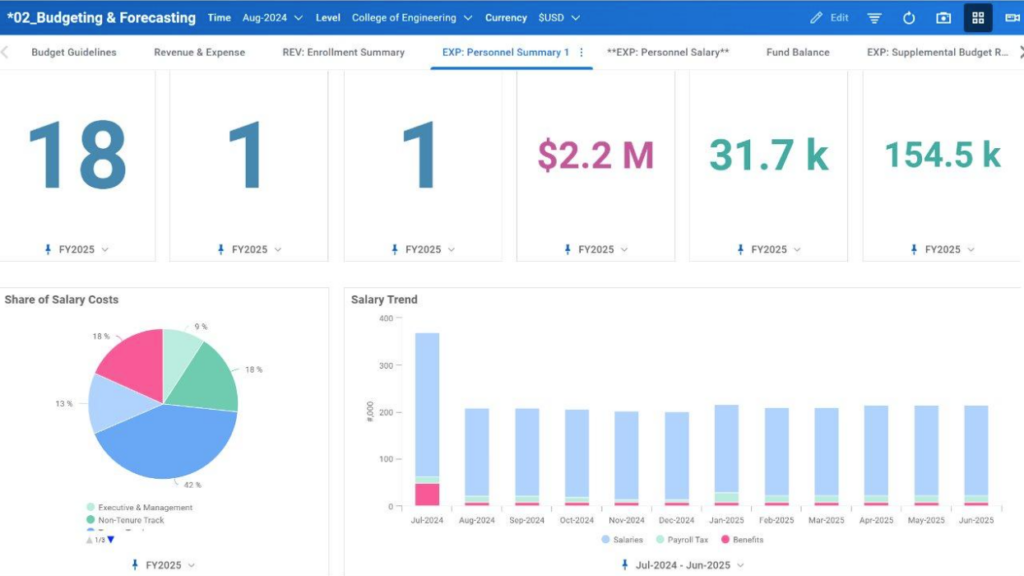
For a finance office, the plain description is this: Adaptive is where the budget gets built, revised, and compared against actuals. Departments enter requests, central budget staff review and adjust them, and leadership runs scenarios before the board sees a number. Instead of hundreds of spreadsheets bouncing around by email, everyone works in the same live model, and the roll-up happens the moment a manager hits save. Over the years Adaptive has remained a leader in enterprise performance management (EPM), adding enhanced workforce planning and AI capabilities through Adaptive Decision Intelligence.
Why Not Just Enter the Budget in Workday?
A question I hear often: why do we need Adaptive when we can enter a budget directly in Workday?
Think of it this way. Say you have prepared a $100 million tuition revenue budget. That number sits in Workday Financials, but on its own it tells you nothing about how you got there.
In Adaptive, I can drill into that number and see the projected students, tuition rate, and retention factor behind it. I can enter budget numbers with the ease of Excel, in an audit-controlled environment, and spin the same model off into multiple scenarios.
How Colleges Use Workday Adaptive Planning Today
Most campuses start with the operating budget: department and division budgets rolled up by funds, cost center, and program. Position and salary planning usually follows, and it carries the most weight. At the institutions I’ve worked with, compensation and benefits are the majority of the operating budget. So planning by position for new, open and filled positions, with fringe rates and vacancy assumptions, is where accuracy is won or lost.
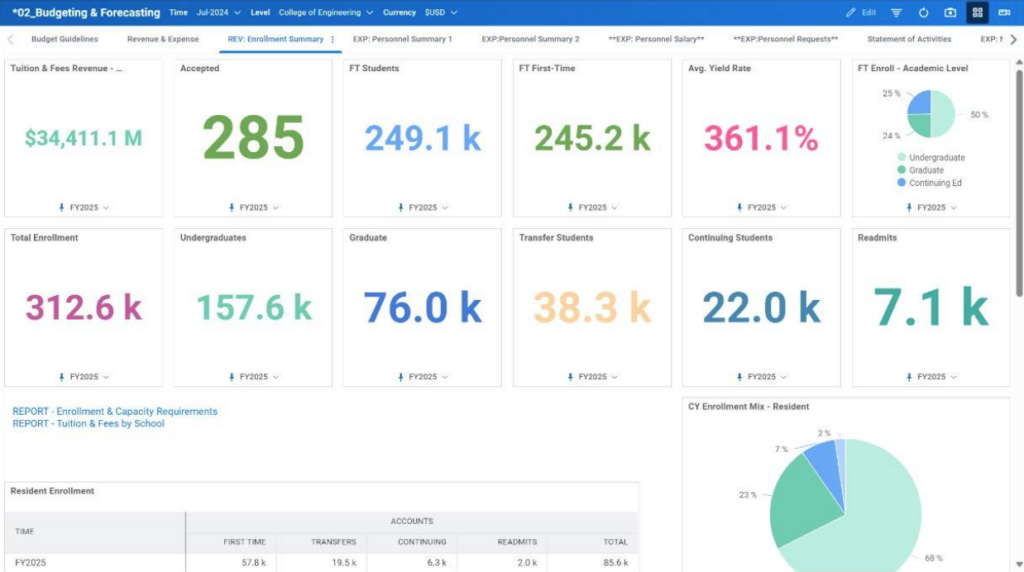
Revenue modeling ties tuition and fee revenue to enrollment, discount rate, and credit hour assumptions. Multiyear forecasting gives the CFO three-to-five-year projections to show the board under different enrollment or state funding scenarios.
Budget-to-actual reporting gives department heads variance views without logging into the general ledger. That includes year-over-year budget views for grants and projects that span multiple fiscal years.
More mature campuses add capital planning, sponsored research projections, auxiliary planning, budget allocation models, and long-range financial models.
The Bar for College Planning Has Moved
Over lunch recently, I asked a college president what keeps them up at night. The answer: very limited visibility into the cost of instruction.
There was a time when simply getting out of spreadsheets, files named “Operating Budget FINAL v7a,” and the data-wrangling business counted as a success.
Now the stakes are higher, as that lunch reminded me. Leaders are asking for program-level P&Ls and a clear view of what it costs to deliver instruction, and they want to see how those decisions connect. That raises the bar for a modern, connected planning solution, where the financial impact of a scenario can be modeled in minutes, not days or weeks. It also only works if Program and cost allocations are designed into the Worktags from the start, which is why the budget office belongs in FDM design.
Planning Belongs in the Design Conversation on Day One
So, when should a college bring Adaptive into a Workday project? My short answer: bring planning into the design conversation on day one, even when the Adaptive build happens later. The build date is a real choice with real tradeoffs. The design input is not optional. In practice, that means a budget office representative in every FDM design session, with the authority to raise planning requirements.
The reason is the Foundation Data Model (FDM). Workday Financials organizes accounting through the FDM, using Worktags such as Cost Center, Fund, Program, Grant, and Gift. Adaptive builds its planning structure from those Worktags.
When the budget office is not in the room during FDM design, the structure can end up too detailed for budgeting in some places and missing what planners need in others.
Timing Options for Deploying Adaptive Planning
Option 1: After Financials Go-Live (What I Recommend)
This is the most common pattern I see, and the one I usually recommend. The college goes live on Financials and stabilizes it, and the Adaptive Planning work starts right around go-live, once the Gold tenant is up.
It works well when two things are true from the start. The FDM was designed with budget office input, and there is a clear plan for the first one or two budget cycles. With a July 1 go-live, the first budget usually runs on an EIB (Workday’s spreadsheet upload tool) load, and Adaptive is ready for the next cycle. That bridge loads the budget from the legacy system into Workday, sometimes supported by a crosswalk (a mapping of your old account codes to the new Worktag structure).
Without that plan, the bridge becomes a scramble in February. The budget office ends up rebuilding next year’s budget by hand, under deadline, while it is still learning Financials.
If the college budgets at the spend category or revenue category level, but Workday budgets weren’t set up at that level, that becomes a miss and a mapping effort. The EIB and mapping get the budget loaded, but the college loses the detail it built the budget around.
Option 2: Alongside Financials
In this approach, Adaptive is scoped in the same program and goes live with, or shortly before, Financials. The budget office builds the first budget of the Workday era in Adaptive, using the new FDM.
This is possible, and it is often the approach large system integrators prefer. Adaptive is easier to sell midstream, as part of a packaged “transformation” deal. In my experience, 99% of the time the juice is not worth the squeeze.
The biggest cost is people. The same budget staff who are testing Financials are also building next year’s budget, and something has to give. And despite the packaging, Adaptive is a separate acquisition on its own tenant, so going live at the same time does not make it truly integrated.
This approach also puts a lot of stress on the institution and too often leaves no room to rethink planning processes. It is usually better to load the budget from the legacy system into Workday through an EIB, then bring that budget into Adaptive when Adaptive is ready. The organizational side of these tradeoffs, governance, staffing, and the first budget cycle, is where most of the risk concentrates, as we cover in the Top Workday Implementation Issues in Higher Education article.
Technology is the easy part. The hard part is unpacking 20-year-old planning processes, and that takes time and attention an institution doesn’t have in the middle of a Financials implementation. Too often Adaptive becomes an afterthought: the license that came with the Workday deal, a line item in the SOW nobody looks at until it’s too late. “It’s included, we’ll turn it on later” is exactly how colleges end up with an Adaptive model that doesn’t fit the FDM they just built.
The problems show up behind the scenes. The FDM may still be in development, so the team is building against a structure that has not been agreed on. Integrations often need rework, because Workday IDs (WIDs) can differ between tenants and references that worked in one tenant break in the next.
Option 3: Planning First, on the Legacy Chart of Accounts
One college I worked with was not on Workday at all. Phase 1 used Adaptive for reporting. Phase 2 added budgeting and planning. Phase 3 rebuilt their budget allocation model in Adaptive. It was crawl, walk, run in practice.
The risk is rework. When the college later moves to Workday Financials, the Adaptive model needs to be restructured around the FDM. That can be manageable for a small model. It gets expensive for a model with deep position planning and many departmental sheets.
Six Questions to Decide When Adaptive Comes In
When I help a college make this call, these are the questions I ask first:
- When does your fiscal year start, and when does budget development begin relative to the Financials go-live date?
- Who in the budget office is also a Financials subject matter expert, and how many hours can they give each week during budget season?
- Who is representing budget and planning needs in FDM design workshops today?
- How will the first budget in the new structure be built, approved, and loaded into Financials?
- How much of your budget is position based, and how clean is your position data in HCM?
- Is the board asking for multiyear scenarios now, or can that wait a cycle?
The answers usually point to one approach quickly. They also show where the gaps are, whether that is staffing, data quality, or a missing plan for the first budget cycle.
Steps That Protect You When Adaptive Comes Later
A college can defer the Adaptive build and still protect itself. Document how each department budgets today: which Worktags, at what level of detail, and who approves.
Decide early whether budgets will be loaded into Financials, and at what level of detail, so the budget structures are built to match. Write a plan for the first budget cycle in the new structure, including the crosswalk owner and the load date.
Ask your HCM team how vacant positions and costing allocations will be handled, because salary planning depends on both. Finally, put Adaptive on the program roadmap with a target phase, so it gets budget and staffing attention.
Final Thoughts
Adaptive gives colleges a chance to move budgeting from a manual exercise to an analytical one. Getting the timing right protects that opportunity, and so does giving planners a voice in FDM design from the start.
If you lead the budget office, ask yourself two questions before your next steering committee meeting: How will next year’s budget get built? And where will it live once Financials goes live?
The good news is that Adaptive is not a big-bang ERP implementation. You can take on as much as you’re ready for and follow a crawl, walk, run approach. What matters is knowing where you want to end up, so that destination is built into your Workday design decisions now.If you want an honest read on where Adaptive fits in your Workday timeline, I’m glad to talk it through. You can also explore our Workday consulting services for higher education to see how we support finance and budget teams. Schedule a Discovery Call
About the Author
Brian Teets has 13 years of hands-on experience with Workday Adaptive Planning and 20 years in enterprise finance across higher education, healthcare, and the public sector. He has worked at Deloitte, Accenture, and small boutique partners.
His first exposure to Adaptive Planning came on the client side, as Budget Manager and Adaptive Planning Administrator at Montclair State University. The University implemented Adaptive Planning in 2013. The rollout reached more than 200 users, came in on time, and was honored that year with the Adaptive Planning Torch Award for Best Business Impact. A Nucleus Research case study documented a 211% ROI and a 7.2-month payback.
So he understands the problem from both sides of the table. He bridges Finance, IT, and HR in a way most consultants can’t.
Throughout his career, he saw the same pattern again and again. Adaptive Planning by Workday was often an afterthought in large engagements, and clients were left to struggle once the implementation partner moved on. He believed clients deserved better.
He has delivered over 50 end-to-end implementations for clients ranging from a top-3 ranked university, medical colleges, large medical systems, and pharmaceutical companies. He designs, builds, and fixes the models, integrations, and reports himself. He is a degreed accountant with a dual MBA in Finance and Management Information Systems.
About David Kent Consulting
David Kent Consulting is a higher education ERP consulting firm specializing in Workday, Banner, and Oracle implementations. We work alongside institutions as an independent advisory and delivery partner throughout every phase of complex technology projects. Our senior-only team brings decades of hands-on experience in higher education IT.
Frequently Asked Questions
Adaptive from Workday, formerly called Workday Adaptive Planning, is Workday’s cloud application for budgeting, forecasting, workforce planning, and reporting. At a college, it is where departments enter budget requests, central budget staff review and adjust them, and leadership models scenarios before presenting to the board. It works alongside Workday Financials and HCM, drawing actuals and position data from them, so budgets and forecasts live in one secure, audit-controlled place instead of in dozens of emailed spreadsheets.
Yes. Adaptive can connect to other ERPs and general ledgers, so a college does not need to be on Workday Financials to use it. The tradeoff is that the Adaptive model will need to be restructured around the Foundation Data Model once Financials arrives, which is manageable for a small model and more costly for a complex one.
Implementation time depends mostly on scope. A focused operating budget and position planning model can take a few months. Adding revenue modeling, capital planning, sponsored research, and multiyear scenarios extends the timeline. In my experience, college projects have run as short as 16 weeks and as long as 8 months. Data readiness, especially position data in HCM, and the availability of budget office staff during budget season are the biggest factors in where a project lands.
The budget office should own the Adaptive model, with support from IT for integrations and security. Planning requirements change every budget cycle, and the people closest to the budget are best placed to adjust sheets, assumptions, and workflows. Colleges that leave model ownership with an outside partner or a single IT administrator tend to struggle when the next budget cycle brings new requirements, because every change becomes a request instead of a quick update. Day-to-day administration can be shared between the functional team and IT, but final ownership should sit clearly with the budget and planning office.
No. Adaptive is where the budget is built, modeled, and compared against actuals. Budget checking and commitment control, where a campus uses them, live in Workday Financials. The approved budget from Adaptive feeds those Financials budgets, so the two work together. This is one reason to decide early what level of detail the budget will be loaded at, since the budget structures in Financials need to match what Adaptive sends.
